
Zoom Meeting Makeup Tips: Look Professional and Awake on Camera in 2026
Your high-definition webcam isn't actually your friend; it's a digital thief that steals your facial definition and leaves you looking completely washed out. It is incredibly frustrating to feel confident in the mirror only to see a tired, pale version of yourself once the camera turns on. We have all dealt with those harsh under-eye shadows and the distracting shiny forehead caused by bright ring lights. This is why mastering specific zoom meeting makeup tips is the ultimate power move for your professional image as the global cosmetics market hits $105.2 billion in 2026.
You deserve to look as sharp and energized as you feel during every presentation. We are diving into the strategic secrets that combat digital desaturation and bring your best features back to life. You will discover how to manage glare with matte finishes, which multi-purpose products create a natural glow, and why a quick swipe of mascara is the fastest way to look instantly awake. It's time to simplify your routine. Maximize your impact on screen with these expert-approved, value-driven essentials.
Key Takeaways
- Prime your digital canvas with deep hydration to stop high-def lenses from magnifying dry patches or uneven texture.
- Implement strategic zoom meeting makeup tips like the "20% saturation rule" to ensure your features remain sharp and defined on screen.
- Frame your face by prioritizing brow definition; this creates a structural anchor that keeps you looking polished and professional.
- Switch to high-pigment lip shades like soft berries to prevent your complexion from disappearing under harsh office lighting.
Mastering the Digital Canvas: Skincare and Base for High-Def Calls
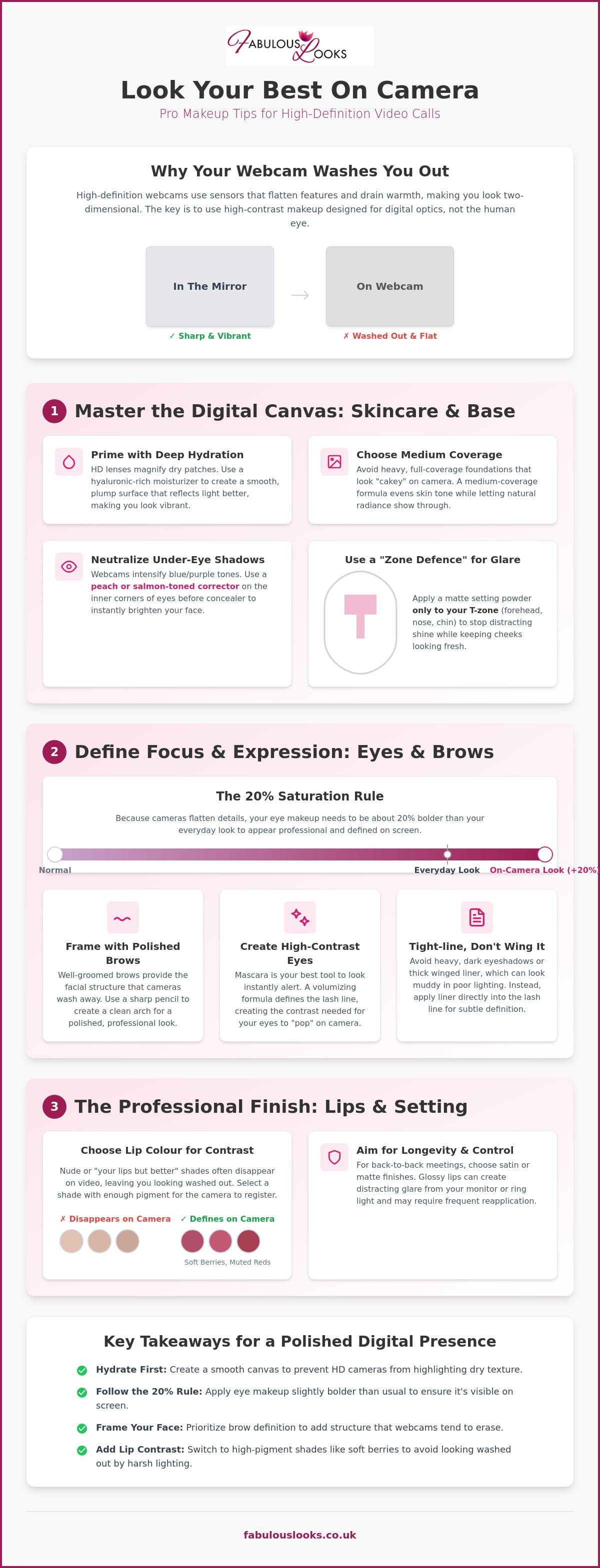
Webcams use CMOS sensors that process light differently than the human eye. These sensors tend to flatten your features and drain the warmth from your skin, leaving you looking two-dimensional. This is why professional "Zoom Makeup" is actually a high-contrast application designed specifically for digital optics. To truly master your zoom meeting makeup tips, you have to move beyond your standard mirror routine and think about how your camera translates light and shadow.
Heavy, full-coverage foundations often look like a mask on high-definition calls. They can appear "cakey" or unnatural when the digital lens tries to sharpen the image. Opt for a medium-coverage formula instead. It evens out your skin tone while letting your natural radiance peek through. To handle the harsh glare from your ring light, use a "Zone Defence" strategy. Apply a matte setting powder only to your T-zone, specifically the forehead, nose, and chin. This stops the camera from picking up distracting shine while keeping your cheeks looking fresh and healthy.
The Hydration Foundation
Digital lenses are notorious for exaggerating skin texture. If your skin is thirsty, the camera will find every dry patch and fine line. Using hyaluronic-rich moisturisers creates a smooth, even surface for your base. Explore the range of REN skincare to find a clean, hydrating formula that preps your face perfectly. A plumped skin surface reflects digital light better, ensuring you look vibrant rather than dull and tired.
For an even more refined digital canvas, high-tech skincare devices and solutions from Luminous Touch can help you achieve a smooth, camera-ready complexion that requires less concealer.
Correcting Under-Eye Shadows
Webcams have a frustrating habit of intensifying blue and purple undertones, making under-eye circles look much darker than they are in real life. You don't need to pile on heaps of product to fix this. Use a peach or salmon-toned corrector to neutralise the darkness first. Apply your concealer strategically; focus only on the inner corners of your eyes where the shadow is deepest. This brightens your entire face instantly without the risk of the product settling into lines during a long call.
Eye and Brow Definition: Creating Focus and Expression
Webcams blur fine details and flatten facial depth. This is why your eyes can look small or tired during a call. To fix this, you must follow the saturation rule. Your eye makeup should be roughly 20% bolder than your everyday look. If it feels slightly dramatic in person, it will look perfectly professional on screen. Avoid dark, heavy shadows on the lids. These often translate as muddy shadows or bruises in poor lighting, making you look exhausted instead of alert. These strategic zoom meeting makeup tips focus on creating the contrast your camera needs to see you clearly.
Framed for Success: Polished Brows
Your eyebrows are the frame of your digital presence. They provide the facial structure that webcams often wash away. Use a sharp brow pencil to create a clean, professional arch that defines your face. A well-groomed brow signals attention to detail and helps convey your expressions clearly during presentations. It is a simple step that adds instant authority to your look in any corporate WFH setting. Don't let your features disappear; give them the structure they deserve.
High-Contrast Eyes: The Mascara Secret
Mascara is your best tool for opening up the eyes and looking instantly more alert. A volumising formula like Maybelline Lash Sensational defines your lash line without the need for heavy, messy shadows. It creates the high contrast necessary for your eyes to "pop" on camera. Instead of a thick, heavy wing, try a tight-lined eyeliner approach. This involves applying liner directly into the lash line for a subtle, defined look that won't get lost in digital noise. For more eye-defining essentials and professional advice, explore our branded makeup UK guide. These zoom meeting makeup tips ensure you stay focused and expressive throughout your day. You can find everything you need to upgrade your routine in our complete beauty collection.
The Professional Finish: Lip Colour and Setting Strategies
The final step in your routine is the one that truly brings your face back to life on screen. While "your lips but better" shades are great for coffee dates, they often disappear completely on a video call. This leaves you looking monochromatic and washed out. These zoom meeting makeup tips focus on creating a healthy contrast that the camera can actually register. A soft berry or a muted red provides enough depth to define your mouth without looking overly dramatic for a morning briefing.
Longevity is the biggest challenge when you have a day full of back-to-back meetings. Glossy finishes can look messy or reflect too much light from your monitor. Stick to long-wear matte formulas. They stay in place through your third cup of coffee and don't require constant touch-ups. If you're worried about transitioning to real-life after your call, simply blot the colour with a tissue. This leaves a soft stain that looks natural for errands while keeping you "Zoom-ready" for the next invite. It is the easiest way to bridge the gap between your digital persona and your real-world schedule.
The Digital Pop: Lip Colour Selection
Choosing the right shade is about balance. You want a colour that pops against your skin tone to provide clear definition. For a punchy, professional finish, we recommend exploring the Maybelline Color Sensational range. These pigments are designed to hold their vibrance even under the blue light of a laptop screen. If you're unsure which texture suits your busy schedule, check out our Maybelline lip guide to find your perfect 2026 formula.
Lockdown: Setting for All-Day Performance
A professional look only works if it lasts until your final sign-off. Mid-afternoon shine is a common pain point; it is especially noticeable when your laptop starts running hot. Use a light dusting of translucent setting powder to lock in your base. This prevents the "oil-slick" look that webcams love to highlight. Finish with a quick mist of setting spray. This keeps your makeup from settling into fine lines during those long, intense strategy sessions. These zoom meeting makeup tips ensure you stay fresh from 9-to-5 without needing a mirror every hour.
Elevate Your Digital Presence Today
You now have the complete blueprint to beat webcam washout for good. By focusing on high-contrast base prep and bold brow definition, you ensure your features stay sharp even through the lowest-resolution lenses. Remember that the right lip shade isn't just about colour; it is about bringing energy back to your face when digital sensors try to drain it. Implementing these zoom meeting makeup tips will help you step into every call with total confidence. It is all about working with the light rather than fighting against it.
Beyond your beauty routine, your choice of attire is a vital part of your professional brand on screen. To complete your high-impact look, you can discover Brandme for premium, personalized corporate clothing that ensures you project confidence in every meeting.
Don't wait for your next meeting invite to upgrade your look. Shop the full range of high-street branded cosmetics at Fabulous Looks to find your new on-camera essentials. We guarantee 100% genuine products from industry leaders like L’Oreal, Maybelline, and Revlon. Plus, you can take advantage of free UK delivery on all orders over £25. Our team is proudly rated 5 stars for customer service, ensuring a seamless shopping experience every time. Get ready to look refreshed, awake, and completely in control of your digital image. You've got this!
Frequently Asked Questions
How can I stop my skin from looking so pale on Zoom?
You can stop your skin from looking pale by adding strategic warmth with bronzer and a brighter-than-usual blush. Webcams desaturate your natural skin tones, so you need to compensate with slightly more pigment. Apply bronzer where the sun naturally hits your face and use a soft berry or peach blush to bring life back to your cheeks. These quick zoom meeting makeup tips ensure you look healthy rather than washed out by your monitor's blue light.
What is the best lighting for a video call?
The best lighting for a video call is soft, diffused natural light coming from directly in front of you. Position your desk facing a window to achieve the most flattering glow. If natural light isn't an option, a ring light set to a warm or neutral temperature is a great investment. Avoid overhead lights or sitting with a window behind you, as these create harsh shadows and make you appear as a dark silhouette on camera.
Do I need to wear more makeup for a video call than in person?
You don't necessarily need more product, but you do need more pigment saturation. Digital lenses flatten your features, so applying your eye and lip makeup roughly 20% bolder than your everyday look helps you maintain definition. Focus on high-contrast areas like your brows and lash line. Using effective zoom meeting makeup tips like this allows you to look polished and professional without the heavy, "cakey" feel of traditional full-coverage application.
How do I hide dark circles under my eyes on camera?
Hide dark circles by using a peach or salmon-toned colour corrector before applying your concealer. Webcams often intensify the blue and purple tones under your eyes, making them look deeper than they are. Apply a brightening concealer specifically to the inner corners of your eyes where the shadow is darkest. This targeted approach creates an instantly awake appearance without the product settling into fine lines during long digital presentations.